
| Group → | 1A | 2A | 3B | 4B | 5B | 6B | 7B | 8B | 8B | 8B | 1B | 2B | 3A | 4A | 5A | 6A | 7A | 8A | |||||||||||
| ↓ Period | |||||||||||||||||||||||||||||
| 1 |
1 H |
2 He |
|||||||||||||||||||||||||||
| 2 |
3 Li |
4 Be |
5 B |
6 C |
7 N |
8 O |
9 F |
10 Ne |
|||||||||||||||||||||
| 3 |
11 Na |
12 Mg |
13 Al |
14 Si |
15 P |
16 S |
17 Cl |
18 Ar |
|||||||||||||||||||||
| 4 |
19 K |
20 Ca |
21 Sc |
22 Ti |
23 V |
24 Cr |
25 Mn |
26 Fe |
27 Co |
28 Ni |
29 Cu |
30 Zn |
31 Ga |
32 Ge |
33 As |
34 Se |
35 Br |
36 Kr |
|||||||||||
| 5 |
37 Rb |
38 Sr |
39 Y |
40 Zr |
41 Nb |
42 Mo |
43 Tc |
44 Ru |
45 Rh |
46 Pd |
47 Ag |
48 Cd |
49 In |
50 Sn |
51 Sb |
52 Te |
53 I |
54 Xe |
|||||||||||
| 6 |
55 Cs |
56 Ba |
57 71 |
72 Hf |
73 Ta |
74 W |
75 Re |
76 Os |
77 Ir |
78 Pt |
79 Au |
80 Hg |
81 Tl |
82 Pb |
83 Bi |
84 Po |
85 At |
86 Rn |
|||||||||||
| 7 |
87 Fr |
88 Ra |
89 103 |
104 Rf |
105 Db |
106 Sg |
107 Bh |
108 Hs |
109 Mt |
110 Ds |
111 Rg |
112 Cn |
113 Uut |
114 Fl |
115 Uup |
116 Lv |
117 Uus |
118 Uuo |
|||||||||||
| Lanthanides |
57 La |
58 Ce |
59 Pr |
60 Nd |
61 Pm |
62 Sm |
63 Eu |
64 Gd |
65 Tb |
66 Dy |
67 Ho |
68 Er |
69 Tm |
70 Yb |
71 Lu |
||||||||||||||
| Actinides |
89 Ac |
90 Th |
91 Pa |
92 U |
93 Np |
94 Pu |
95 Am |
96 Cm |
97 Bk |
98 Cf |
99 Es |
100 Fm |
101 Md |
102 No |
103 Lr |
||||||||||||||
|
|||||||||||||||||||||||||||||
Click here for the Other Dynamic Periodic Table...
________________________________________________________________________________________
Chemistry Freeware Links
On this page, I post reviews and links to freeware chemistry programs available for download on other websites. All of the programs are ones that I have used or currently use. However, I assume no responsibility for any problems you might experience as a result of installing any of these applications. Unless otherwise noted, the programs are for Windows systems.
 ACD/ChemSketch 12 Freeware. ACD continues to release updates to the outstanding ChemSketch freeware. ChemSketch is an all-purpose chemical drawing and graphics software. Use templates or draw freehand. Click and draw molecules, ions, stereobonds, text, polygons, arrows, lab equipment, etc. Automatic calculation of molecular weight and chemical formula. View estimates of density, refractive index, molar volume, etc. ACDLabs also offers free downloads of several useful utilities and template packages that expand the functionality of ChemSketch.
 Free Periodic Table of Elements from MobileReference: Free periodic table. Melting and boiling points, density, electronegativity, and electron affinity. Features: Optimized for small screens, including atomic numbers, symbols, and atomic weights. Chemical symbols. Navigate via the Table of Contents or search for words and phrases. Access the guide anytime, anywhere—at home, on the train, or on the subway. Prepare for exams. Always have the guide on hand for quick reference. Version 8.1 improves search and navigation.
 Avogadro Avogadro is an advanced molecular editor designed for cross-platform use in computational chemistry, molecular modeling, bioinformatics, materials science, and related fields. It offers a flexible rendering framework and a powerful plugin architecture.
 Accelrys Draw is a program that allows you to generate structural formulas for complex molecules using a highly intuitive drag-and-drop interface. The resulting images can then be exported to a variety of graphic formats for use on websites or in word-processor documents. Although of limited use to a beginning high school chemistry student, this could be a very valuable application for AP or college students. It is particularly valuable to chemistry instructors and is free for academic and non-commercial use. Available for PC only. REGISTRATION IS REQUIRED.
Free Accelrys JDraw for academic and non-commercial use. JDraw allows you to draw structures and reactions and copy them to another application that supports chemical entities; examples include Accelrys Draw, ISIS/Draw, and ChemDraw. You can also copy structures from these applications and modify them in JDraw. A graphic image is also copied to the clipboard, allowing you to paste it into Microsoft Word or Microsoft PowerPoint for reporting purposes.
Discovery Studio Visualizer 3.1 For those of you who remember WebLab Viewer, this is the updated version of that software from Accelrys. It includes a powerful molecular graphics viewer with superb rendering. An additional benefit is that graphics can be embedded in presentations such as PowerPoint using Object Linking and Embedding (OLE). You must complete a survey before downloading the software from Accelrys.
 ChemAxon produces a wide range of Java-based chemistry tools and offers free academic licenses (you must register with them). While many of these tools are most useful at the university level, there are several sketching and visualization tools that are also quite useful at the high school level. Their “Marvin” applets include sketching and visualization tools that may be used freely on non-commercial websites. Because these are written in Java, they run on almost any platform, and the applets run within most browsers.
 Avogadro is an advanced molecule editor and visualizer designed for cross-platform use in computational chemistry, molecular modeling, bioinformatics, materials science, and related fields. It offers flexible, high-quality rendering and a powerful plugin architecture. The software runs on Windows, Linux, and Mac OS X, and all source code is available under the GNU GPL.
 Molegro Molecular Viewer is a free, cross-platform application for visualizing molecules in PDB, SDF, Mol2, and MVDML formats, as well as docking results from Molegro Virtual Docker. This cross-platform application runs on Windows, Linux, and Mac OS X. Features include automatic molecule preparation, as well as visualization of molecular surfaces and backbones.
 Jmol is a free, open-source molecule viewer for students, educators, and researchers in chemistry and biochemistry. It is cross-platform and runs on Windows, Mac OS X, and Linux/Unix systems. The JmolApplet is a web browser applet that can be embedded in web pages. The Jmol application is a standalone Java application that runs on the desktop. The JmolViewer is a development toolkit that can be integrated into other Java applications. Jmol is the applet I use to run my Molecule Library. I highly recommend it!
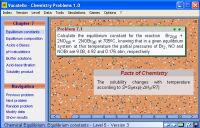 Chemistry Problems 1.0 utilizes advanced numerical methods to instantly and continuously generate new scenarios and data to be incorporated into numerous problems covering the various topics traditionally included in a basic chemistry course. In each case, the software also calculates the corresponding solutions and displays them when prompted. Problems and solutions can be exported to pre-formatted text files, allowing users to create customized problem sets of any length and complexity. Various difficulty levels can be selected, ranging from the Basic Level (corresponding to the foundational knowledge required for beginners) to the Excellent Level (a student capable of solving all problems at this level in various versions is certainly very well-trained). Once a level is selected, the software displays only problems of difficulty equal to or lower than the chosen level. The level can be changed at any time. Topics covered include: Basics; Elements and Compounds; Stoichiometry; Gases, Solids, and Liquids; Solutions; Thermodynamics and Kinetics; Chemical Equilibrium; and Electrochemistry. The software features a number of useful tools, such as an advanced calculator, a graphing tool, a chemical reaction balancer, and a visualizer for simple molecular structures. It also includes simulations of idealized laboratory experiments and a few games, designed to help reinforce fundamental concepts of chemistry while also assessing the user’s level of understanding.
 SimChemistry for Windows allows you to set up, run, and interactively modify simulations on your PC that represent microscopic physical systems. You can play existing demo simulations (including those provided) to learn about the molecular-level behavior behind macroscopic chemical phenomena, or record your own to share with others. You can introduce any number of different types of molecules, each with its own mass, radius, and color, and specify how each pair of molecule types should interact—whether through hard billiard-ball-type collisions or through attractive Lennard-Jones interactions with user-configurable parameters. Observe the behavior of solids, liquids, gases, and mixtures; apply pressure using moving pistons and measure quantities with monitoring regions. Add annotations anywhere to explain what’s happening on screen. Plot XY graphs of changing quantities, and modify parameters using on-screen controls.
 KnowItAll Academic Edition — As part of our ongoing commitment to academia, Bio-Rad is offering this completely FREE and fully functional software package to promote learning and research within the academic community. With the Academic Edition of KnowItAll, you can do it all and learn it all for free—draw structures, perform IR and Raman functional group analysis, and generate high-quality reports. Best of all, this suite of tools is integrated into a single, unified interface, making it easy to learn and simple to transfer data between applications. The KnowItAll Academic Edition also includes free training videos to teach professors and students how to use the software and get the most out of it. This program requires Windows 2000 or XP (Home or Professional).
 RasTop is a molecular visualization software adapted from the RasMol program. I had been looking for a replacement for the formerly free WebLab Viewer program, and this is an outstanding candidate. RasTop wraps a user-friendly graphical interface around the “RasMol molecular engine.” The software allows multiple molecules to be opened in the same window and multiple windows to be open simultaneously. Through an expanded menu and a command panel, users can quickly manipulate numerous molecules and learn about them. Additionally, users can export to POVRay to create artistic renderings of molecules.
 The Chemical Thesaurus software uses a relational database to store information about any chemical reaction process, including: radiochemistry, phase change, resonance structure interconversion, conformational interconversion, single-electron transfer, complexation, substitution-displacement-transfer (which are mechanistically equivalent), redox reactions, photochemistry, rearrangements, multi-step mechanisms, synthetic pathways, simple (non-feedback-controlled) biosynthetic pathways, etc., etc., etc. The application is extensively hyperlinked. Just click around, explore, and discover. A web-based version and a downloadable version are available.
 AcidBaseLab is a titration curve calculation program that can be used to simulate real titration experiments. This program does much more than simply calculate the pH of a strong or weak acid (or base). Instead, it can perform ANY pH calculation, regardless of the complexity of the composition being analyzed. During titration, you can monitor the color changes of the solution caused by the indicator. You can easily edit the list of possible acid and base chemicals, as well as the list of pH indicators, to suit your specific needs. Other features include graphical representation (and printing) of titration curves, and the ability to save experiments.
 The Virtual Laboratory from ChemCollective is a new personal favorite. The online version is a Java applet, but they now offer a downloadable version that runs on any Windows desktop computer. The software enables students and instructors to simulate a wide range of laboratory activities. Acid-base titration, buffer chemistry, stoichiometry of the limiting reactant, and solution equilibria are just a few of the simulations possible with this software. There is also anAuthoring Program that allows instructors to design their own lab activities and add their own reagents.
 EniG. Periodic Table of the Elements contains basic data about the elements in 7 languages (Croatian, English, French, German, Italian, Spanish, and Portuguese). It visually demonstrates how physical states change with temperature. The language, the rate of temperature change, and the exchange of elements can be adjusted via a configuration file. The calculation module from the Chemistry Assistant program, which enables rapid calculation of the molar mass of compounds, has also been integrated into the Periodic Table. The Periodic Table can be incorporated into presentations; the temperature change can be started automatically, and the program can be closed. The background color can be adjusted to match the color of the presentation slide.
 Calc98 is a free engineering, scientific, and financial calculator for Windows. The program includes functions for statistics, the use of different number bases (binary, octal, hexadecimal, and base-n), metric unit conversions, and physical properties and constants. It features financial functions, including investment, loan, and mortgage calculators. It also calculates time-related functions and includes a stopwatch feature. It runs on Microsoft Windows (Windows NT, Windows 95/98/ME, Windows 2000/XP) and Windows CE (Pocket PC).
 The Royal Society of Chemistry’s TrueType Font is a Windows TrueType font that allows you to insert all those hard-to-find chemistry symbols into your word processing documents. The font is free, but it is protected against embedding. If you try to use it in an Acrobat PDF document, the font will not embed, and the reader of the document will need to have the font installed to understand your work.
 ChemLand is a program with numerous modules designed to illustrate and explore important chemical principles and, in some cases, simulate laboratory activities. This is the original program available on the website of its creator, Dr. William Vining. I have not tested this program on Vista or XP, so I cannot confirm its compatibility with those operating systems. You may need to run it in compatibility mode.
 Convert is an easy-to-use unit conversion program that converts the most common units of distance, temperature, volume, time, speed, mass, power, density, pressure, energy, and many others—including the ability to create custom conversions!
 Orbital Viewer is a program for drawing orbitals. It offers many features and is available in both a Windows version and a command-line interface version. Draw any atom or molecule, create animations, generate cross-sections, and display regions where the probability drops to zero. Illuminate the orbital from any location, cast shadows, and save files in TIFF, PPM, BMP, AVI, and VRML formats.
 Sicyon is a software tool for anyone who uses physical or chemical formulas and tables of constants—whether students or professors, physicists or chemists, scientists or engineers. It is easy to use and has everything you need when calculating or analyzing your formula. Sicyon is an all-in-one software package consisting of an expression calculator, a database of constants, a units converter, and a solver. A superb program that requires only 1.5 megabytes of hard drive space.